Integrating AI into your current workflows isn’t just a tech upgrade, it’s a cultural shift in how work gets done. In our previous posts, we mapped out automation opportunities and picked the right AI tools for automation. Now we focus on plugging those AI solutions into your existing systems and adapting organizational habits so that people and AI work in harmony.
You don’t have to rip and replace all your legacy systems to benefit from AI. In fact, the best approach is usually an evolution, not revolution! A layer of AI into your current architecture step by step. Here are key strategies to integrate AI effectively:
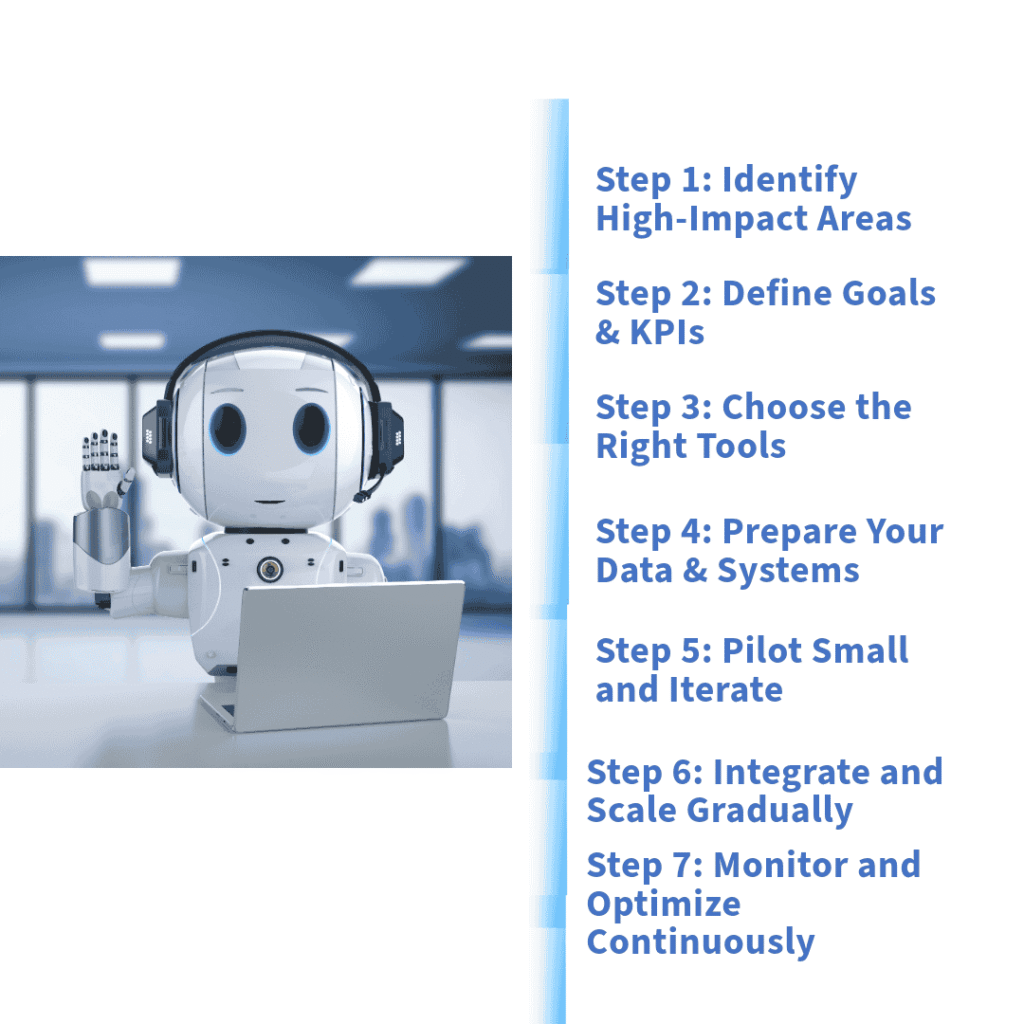
These steps provide a structured roadmap: identify where to apply AI, integrate it one piece at a time into your existing systems, and keep iterating. AI doesn’t operate in isolation, the most impactful AI scenarios depend on seamless access to systems, data, and processes across your business. By building a solid integration layer, you ensure your AI can talk to all relevant systems.
Another key strategy is incremental modernization. Rather than a big bang system overhaul, integrate AI to enhance specific legacy functions. This yields quick wins and minimizes disruption. Deutsche Bank, for instance, added AI modules to its legacy reporting systems to automate compliance checks, rather than rebuilding the whole solution. This “bolt-on” approach gave them modern capabilities (like identifying risks automatically) while keeping what already worked in place. A similar strategy is at the heart of KolofonACE, which helps businesses embed advanced AI without replacing their core systems.
Finally, don’t forget defining ownership and governance as part of your strategy. Decide early who will maintain the AI systems, update models, and manage data quality. Many companies form an AI integration task force or Center of Excellence to oversee deployments and share best practices. Having clear ownership prevents the integrated AI from becoming a “set and forget” black box.
In summary, plan it out, start small, integrate via interfaces, and constantly refine. With that approach, you can weave AI into the fabric of your existing operations reliably and intelligently.
Adapting Organizational Habits to Leverage AI
Successful AI integration isn’t only about technology, it requires a shift in people’s habits and the company culture. Getting the most out of AI means helping your team embrace new ways of working. Here are best practices for adapting habits and mindsets:
Secure Leadership Buy-In and Set the Tone: Change flows from the top. Leaders should champion the AI initiative, actively use AI tools themselves, and communicate a clear vision of how AI will benefit the organization (and employees). If executives and managers visibly rely on AI-driven insights in meetings and decision-making, it signals to everyone that using AI is encouraged, not optional.
Involve Employees Early and Address Fears: Don’t drop AI on teams without warning. Involve end-users in pilot projects and listen to their feedback. This inclusion makes them feel ownership of the new tools instead of feeling that something is being imposed. Also be transparent that AI is there to augment, not replace. It’s natural for staff to worry about job security or that “the AI will take over my role.” Explicitly address these concerns – e.g., by explaining which tasks AI will handle and how roles will shift to more value-add activities.
Provide Training and Upskilling: Adopting AI often means people need new skills, whether it’s learning to interpret model results, manage AI-driven workflows, or simply interact with a new software interface. Invest in training programs to build those capabilities. For instance, if you deploy a Power BI dashboard with AI insights, train teams on how to read the visualizations and drill down for details. If customer reps now have an AI recommendation engine in their CRM, show them how it works and how to feedback outcomes (so they trust it). Also train some “AI champions” in each team, go-to folks who deeply understand the AI tools (perhaps they were in the pilot team) and can help their peers day-to-day. This reduces fear of the unknown.
Integrate AI into Daily Processes: Humans are creatures of habit. So to change behavior, make the new way as seamless as possible. Embed AI outputs into the tools and workflows people already use. For example, if your team lives in Microsoft Teams or email, deliver AI insights through those channels (perhaps via a Teams bot alert or a daily email summary) rather than expecting people to log into a separate AI portal. The less people have to deviate from their usual flow, the quicker they’ll adopt the AI augmentation. Over time, interacting with the AI should become an unconscious habit.
Encourage Experimentation and Feedback: Create a culture where employees feel safe experimenting with the AI tools and providing feedback. Some team members may figure out creative new uses for the AI. Celebrate and share those “quick wins” to reinforce positive habits. Likewise, if staff spot an AI mistake or limitation, they should be empowered to flag it without fear. Set up a channel (like a dedicated chat group or regular check-in) to discuss how the AI integration is going on the ground. This two-way dialogue helps you continuously improve the system (e.g., retrain the model on cases where it gave wrong predictions) and it makes employees feel valued in shaping how AI works for them and understand that its not just AI automation but AI augmentation.
By securing leadership support, involving users, providing training, embedding AI in regular workflows, and fostering an open feedback culture, you turn skepticism into enthusiasm. Consulting an AI specialist team is the best way to begin this journey.
Overcoming Common AI Integration Challenges
Integrating AI into old systems and getting people to use it isn’t always smooth sailing. Here are some common hurdles:
Technical Compatibility: Legacy systems might not readily talk to new AI services. You may face data in old formats, lack of APIs, or on-prem systems hard to connect.
Data Quality and Silos: AI integration can stumble if data is incomplete, inconsistent, or locked in silos. An ML model is only as good as the data fed to it. Invest time in data preparation and consolidation. Before deploying AI, clean your historical data (remove duplicates, correct errors) and merge datasets where possible to give AI a holistic view.
Security and Privacy Concerns: Plugging in AI means data is moving around in new ways, potentially raising security concerns (will sensitive data be exposed to cloud services? How to prevent leaks or unauthorized access?) or privacy questions. Work closely with your IT security and compliance teams from the start. Leverage features like encryption, access control, and anonymization. Microsoft’s integration tools integrate with Azure AD for identity management and offer encryption in transit and at rest, which helps maintain security compliance across systems.
Measuring Impact and Adjusting: Sometimes companies integrate AI but aren’t sure if it’s really helping (especially if they didn’t set clear KPIs). Without measured results, enthusiasm can fade, and habits revert. In our next post we will explain in detail how to measure the impact of AI adoption.
Conclusion
Integrating AI into existing systems and habits is both a technical endeavor and a human one. The companies that do this successfully end up with the best of both worlds – they preserve the strengths of their existing systems and knowledge of their people, while AI does the heavy lifting in the background. Work gets faster, decisions get smarter, and employees get to focus on higher-value tasks with an AI assistant by their side. Consulting an AI specialist team is the best way to begin this journey and you can contact us anytime to start mapping yours. That is the true promise of integration: not AI in a silo, and not humans struggling alone, but a blended workforce of humans and AI working together, each doing what they do best.